

Create Custom QR Codes with a Free QR Code Generator: How a Free QR Code Helps Small Businesses
In today’s fast-paced world, small businesses need simple, powerful tools to help customers take action quickly. A free QR code generator lets you create custom QR codes that connect your offline materials to your website, online menus, payment links, or review pages with just one scan. You don’t need tech skills or expensive software, just a few clicks and you’re ready to share your information anywhere. Discover how using a free QR code can help your business make it easier for customers to connect, engage, and respond, all while saving time and boosting results.
Key Highlights
QR codes bridge offline and online marketing, making it easier for customers to connect with small businesses using one scan.
Custom QR code generators require no tech expertise, letting small businesses create branded, actionable codes quickly and easily.
Strategic QR code placement on flyers, receipts, signs, and menus enhances customer engagement and streamlines daily operations.
Testing and optimizing QR codes ensures reliable scanning across devices and environments, strengthening the customer experience.
Complementary free tools—like invoicing, reviews, and reminders—help businesses operate efficiently and maximize growth opportunities.
Understanding the Power of QR Codes for Small Businesses
QR codes have transformed how small businesses connect with customers, bridging the gap between the physical world and digital opportunities. When you scan a QR code, the experience is instant, one quick scan, and you’re at a website, review page, booking form, menu, or payment link. This seamless connection helps businesses make the most of every marketing opportunity, encouraging more action from customers. Using QR codes is simple, cost-effective, and surprisingly impactful: they’re easy to make, flexible across platforms, and practical for everything from events to in-store marketing. Harnessing the true power of QR codes can help any business strengthen their brand while connecting offline and online with ease.
Why Every Local Business Should Use QR Codes to Connect Offline and Online
It’s never been more important for a local business to stand out, reach customers, and make every marketing touchpoint count. QR codes allow a small business to turn a simple flyer, sign, business card, or menu into a bridge that leads directly to its online assets. With one scan, customers can open a website, follow a link to special offers, submit a review, pay instantly, or contact the business. Instead of just reading a flyer or seeing a menu, people are prompted to act, they can interact with your brand, forming a deeper connection that extends beyond the initial encounter. When you make your own QR code, you’re giving customers a shortcut to your most important links. If you run local marketing campaigns, QR codes let you measure engagement and prompt real action fast. Your code isn’t just a tech feature; it’s an extension of your brand and business identity, representing you wherever your marketing efforts reach. When customers see your QR code, it signals that your business is up-to-date and values their time, giving them a convenient way to interact immediately. Consistent use of QR codes across your offline and online presence helps create a cohesive brand experience. Place a code on everything from window signs to receipts, and suddenly every touchpoint becomes a potential new connection. This not only boosts your marketing reach but builds brand recognition, with every successful scan, your business becomes easier to remember and access. No matter your industry or marketing budget, integrating QR codes into your daily business can elevate every effort, turning everyday encounters into online engagement and helping your business open more doors, all with a simple, scannable code.
How to Create Custom QR Codes Easily with a Free QR Code Generator
Getting started with custom QR codes is incredibly straightforward with the right code generator. The process allows you to seamlessly bridge your offline marketing and online assets, making it easy for customers to scan and interact with your business. Every business can benefit from learning how to create QR codes quickly and efficiently, whether you want to link to your website, social profiles, booking forms, or payment pages. Using an online QR code generator or a dedicated app puts powerful, customizable QR code creation within anyone’s reach. With just a few steps, you can design, test, and deploy a code that fits your branding and meets your business goals, making smart technology work harder for you.
Step-by-Step Guide to Using a QR Code Generator for Your Business Needs
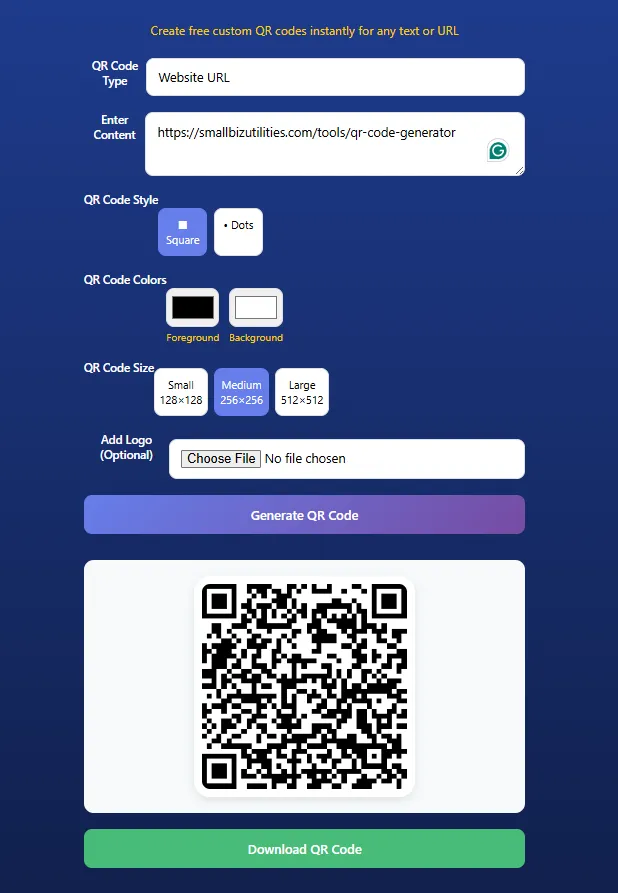
Crafting a custom QR code for your business is easier than ever, thanks to powerful tools like the qr code generator or the adobe express qr code creator. Whether you want customers to visit a url, open a specific link, access a menu, or send you a message, the process begins with selecting your desired code type. Once you choose what action you want the code to trigger, a url, direct call, SMS, or plain text, launch your preferred QR code generator or app. Most of these tools offer an intuitive editor that lets you paste the url or link, adjust the code creation settings, and preview the result instantly.
Start by entering the link, url, or information you want the code to hold. Quality code generators give you the flexibility to choose the right code type based on your needs, whether it’s static for a fixed destination or dynamic if you need the link to be changeable later. Use the customization features in your code generator or online app to adjust the QR’s size, shape, color, and even integrate your branding elements.
Once your design is finalized, most generators allow you to download the code in formats ready for print or digital use. Before printing or sharing, test your new QR, open your phone’s camera or dedicated scan app and scan your code to ensure it works as intended. This process, powered by an easy and reliable code generator, empowers even the smallest businesses to quickly make QR codes that drive engagement. By following these simple steps in your preferred app or qr code generator, you turn any flyer, menu, sign, or receipt into an interactive bridge between you and your customers.
Best Practices for QR Code Design to Maximize Customer Engagement
Effective code design is crucial when it comes to creating QR codes that truly engage your customers and encourage more code scans. The design process begins before you even generate your first code; it’s about thinking strategically on how your code will be seen, scanned, and remembered. Using an intuitive editor in your QR code generator, you can craft dynamic codes with clear calls to action that blend seamlessly into your marketing materials without sacrificing visibility. Contrast is key, design codes with strong color differences between the background and the code itself so that scanning apps have no trouble recognizing the pattern, even in dim light or when printed small.
Dynamic codes are especially valuable for businesses that might want to update their links or information without having to reprint marketing materials. A well-designed dynamic QR code allows you to edit destinations in real time while maintaining the same physical code. This flexibility boosts long-term engagement, as you keep your codes relevant and actionable. When using a code generator’s editor, take the time to preview your design; check that logos, colors, and branding elements don’t interfere with the code’s readability. A cluttered design, or using colors that blend too closely, may lead to fewer code scans and missed opportunities.
Consistency across your codes reinforces your brand identity and helps customers instantly trust and recognize your business. Always test your codes on different devices, ensuring the code scans smoothly from both digital and printed formats. Remember, the aim of your QR code design is not just to look appealing, but to provide a reliable, simple path for customers to connect with you. By focusing on clarity, dynamic features, and user-friendly design, you maximize the power of every scan and strengthen every touchpoint in your marketing journey.
Diverse Uses of QR Codes in Daily Business Operations
As small businesses navigate an increasingly digital marketplace, QR codes have become essential tools for integrating offline and online experiences. Today’s operations demand flexibility, and QR codes enable business owners to link customers directly to websites, booking platforms, payment apps, video content, or review pages, all with a single scan. This technology doesn’t just streamline marketing and transactions; it enhances the customer journey, making branded touchpoints interactive and convenient. Whether printed on receipts, menus, signs, or business cards, QR codes empower businesses to open doors for engagement and instantly deliver information or actions that matter most to customers.
Enhancing Menus, Bookings, Payments, and Reviews with a Single Code
QR codes are transforming day-to-day operations for small businesses by merging critical functions, like accessing menus, making bookings, submitting payments, or leaving reviews, into a fast, easy customer experience. Instead of requiring customers to download a separate app or search for a url, a single scan of a free QR code can instantly open up an interactive menu, launch an online booking system, or direct a user to a payment gateway. Restaurants now rely on QR codes for digital menus, reducing printing costs and enabling real-time updates. Service businesses, such as salons and clinics, use customized QR codes to tie their booking links directly to signs and promotional flyers, letting clients schedule appointments without friction. Retailers, event organizers, and cafes are also leveraging QR codes for quick payments, making every transaction more secure and convenient for both staff and customers. With the right code generator, it’s easy to make a branded QR code that connects directly to your payment platform, eliminating the need for traditional card readers. Small businesses benefit even further by using QR codes to streamline customer reviews. Placing codes on receipts, tables, or business cards prompts satisfied customers to review with just one scan, helping you boost your reputation quickly, without extra effort. Custom QR codes featuring your brand colors and logo turn every code into a mini marketing campaign that reinforces your identity. And because it’s free and simple to make QR codes using trusted online tools, businesses can keep evolving their marketing without extra cost. This unified approach not only creates a seamless customer experience, it amplifies marketing touchpoints, encourages engagement, and positions your business as modern and responsive, all starting with a single code.
Ensuring a Seamless Experience: How to Test and Optimize Your QR Code
Your QR code’s effectiveness goes far beyond its design, it’s the smooth experience that leaves an impression on your customers and drives lasting engagement. Thorough testing ensures your code scans easily in every situation, whether customers use a phone camera, a scan app, or even within varied lighting and print conditions. Businesses that use free dynamic codes and test their codes across devices avoid missed opportunities and disappointing scan failures. By employing an editor to review, make, and optimize each QR code before distribution, you’re making sure every scan delivers instant access to your online assets. Let’s look at the checklist used to make code scans reliable, and why thorough testing is essential to keep your QR codes working well wherever customers may encounter them.
Checklist for Reliable Code Scanning Across Devices and Environments
To achieve the highest number of successful code scans, it’s important to make sure your QR codes are optimized and practical for real-world use. Start by using a trusted QR code generator with an easy-to-use editor, enabling you to make both classic and free dynamic codes. A dynamic code grants you flexibility to update your destination link, reducing the risk of outdated or broken scans. For the best possible outcomes, test your new QR code with various devices, including iPhones, Android phones, and tablets. Each device’s camera and scan app may read a code differently, so open the code using each device to confirm it loads quickly and correctly.
Assess your code’s performance in different conditions: try scanning it in bright sunlight, dim indoor lighting, and under glare, print the code and test on glossy as well as matte paper. If your business plans to display the code on screens, check that screen brightness doesn’t hinder the scan. Larger prints can make code scans easy, but shrinking the size too much may lead to read errors. Make sure the code remains clear, with no smudges or distortions, and that any background images don’t interfere with the scan pattern. This is especially important when using codes on flyers, signs, or receipts, as different materials can affect readability.
Always preview your QR code using the generator’s editor before downloading. If you make changes, such as updating branding, colors, or destinations, run another full test using both your camera app and any specialized scan apps. Many free dynamic code generators allow you to check statistics on code scans, offering insights into how many scans you’re getting and where improvements may be needed. Continuous optimization can include adjusting colors for stronger contrast or making the QR slightly larger to increase usability in diverse situations. Consistent testing and review, using your app and editor, not only make every scan easy but also give customers confidence that interacting with your business will always be quick, seamless, and frustration-free.
Customizing QR Code Design: Using Logos, Colors, and Branding Elements
Custom QR code design isn’t just about making a code that works, it’s a way to express your brand’s personality while building recognition in every interaction. By upgrading from simple monochrome codes to thoughtfully designed QR codes using a reliable code generator, small businesses can add logos, unique colors, and branded elements that go far beyond the basics. With easy-to-use design tools and editors, it’s now simple for any business to ensure that every QR code feels like an authentic part of their brand. Integrating consistent code design across printed and digital materials helps reinforce your visual identity and creates memorable, engaging touchpoints for every customer.
How a Unique Code Generator Supports Your Brand’s Visual Identity
Elevating your QR codes from generic black-and-white squares to vibrant, branded touchpoints is easier than ever with an advanced code generator and design-focused editor. Today’s code generators make it easy for anyone to infuse their business’s style into every detail of a code, whether you want to upload your logo, choose brand-driven colors, or customize the shapes and layout. These design enhancements do far more than just make the code look good; they become a seamless part of your marketing assets, reinforcing your visual identity each time a customer interacts with your codes.
The right code generator acts as a complete design platform for your QR code needs. Using the editor, you can experiment with color palettes, adjust contrast, fine-tune the size, and add your brand’s logo or key graphics without complicated design work. This integration of design and branding means that every QR code, whether static or free dynamic, builds stronger recognition and trust. Customers see your unique design and immediately associate the code with your brand, making every scan an extension of your broader visual strategy.
Dynamic design tools offer another layer of flexibility by letting you update destination links or campaigns while preserving the core code design and brand consistency. No matter where you use your codes, menus, flyers, business cards, or receipts, the visual cues of your brand stand out and drive engagement. By taking advantage of a free dynamic code generator and a robust editor that prioritizes code design, small businesses can create impactful, reliable codes that are easy to scan and impossible to forget. This thoughtful approach ensures codes aren’t just a technical necessity but a natural part of the customer experience, strengthening your brand every step of the way.
Distributing Your Free QR Codes: Where and How to Share Them Effectively
Once you’ve crafted the perfect QR code design to match your brand, the next step is to maximize its impact through strategic distribution. The effectiveness of your free code isn’t just about how it looks, but where and how it’s shared with your audience. By incorporating your custom codes into everyday marketing assets, like flyers, signs, receipts, and even product packaging, you make it easy for potential customers to take action instantly. Well-placed codes can drive engagement, link offline discovery to your online assets, and streamline every interaction with your business without the need for a separate app.
Ideas for Placing Codes on Flyers, Signs, Receipts, and More
Taking full advantage of a free QR code generator gives small businesses a world of opportunities for marketing and engagement. Start by adding your QR codes to all your printed flyers. A flyer with a scannable code makes it easy to link potential customers straight to your website, event signup, or special offer in just a second, there’s no need to type a long URL or download an extra app. Receipts are another top spot: after a sale, include a QR code that lets customers quickly leave a review, claim loyalty perks, or go directly to a feedback link. This turns every transaction into a chance for follow-up and deeper connection with your audience.
Signs are one of the most powerful placements for your codes, both inside and outside your business. Place a free custom QR code on your entry sign, counter displays, or window posters to promote menu access, online ordering, or easy contactless payments. For businesses with dynamic information, such as restaurants with rotating specials, update your QR code’s destination link with a generator, keeping your content fresh without reprinting the sign. Don’t underestimate product packaging and in-store banners, codes placed here can guide buyers to instructional videos, exclusive offers, or warranty registration faster than manual browsing.
Simple marketing materials like business cards or appointment reminder slips also benefit from codes. Integrate your brand’s colors and logo using a QR code generator’s editor to help every scan reinforce brand identity. If you offer a mobile app, add a code right on your card or receipt linking directly to your app download page, making it as easy as possible for customers to connect on the go. Free code generators support quick, hassle-free updates, so you can continually tweak your marketing assets for better results. By thoughtfully distributing your QR codes across key touchpoints, flyers, signs, receipts, and more, you let your brand make the most out of every offline encounter, driving customers back online where you can offer more value and deeper engagement.
Next Steps: Explore More Free Tools Beyond the QR Code Generator
After unlocking the benefits of QR codes, many small businesses look for the next advantage that will save time, simplify daily operations, and fuel consistent growth. Beyond the well-known impact of connecting offline and online experiences with codes, there’s a full suite of free business utilities designed to help you manage reviews, handle invoices, automate reminders, and drive your business forward. These intuitive apps and editors don’t just streamline repetitive tasks, they boost your marketing and your brand, making your business more memorable and trusted. Embrace easy-to-use, free tools to create, manage, and optimize every aspect of your small business journey, one smart step at a time.
Recommended Business Utilities for Reviews, Invoicing, Reminders, and Growth
Growing a business takes more than creative marketing and great customer service, it requires practical tools that help you work smarter. Once you’ve harnessed the power of QR codes with a free code generator and a design editor, adding other free utilities can bring your business operations to a new level of efficiency and professionalism. For reputation management, review apps can make a big difference: with just one scan or click, you can prompt customers to leave feedback right at the point of service. Integrating a review utility, paired with your custom QR codes, not only boosts your online presence, but also helps establish trust in your brand. And because these tools are completely free, you’re saving on marketing costs while enhancing your reputation.
Another essential is a free invoice generator, which removes the stress from billing. With user-friendly editors and templates, you can quickly make branded, professional invoices that reinforce your business identity. Most invoice apps streamline the payment process by generating easy-to-scan payment codes, ensuring your customers can pay immediately in person or remotely. Free reminder apps sync with your invoices, helping you send friendly, timely notification emails or texts so you never miss an appointment or pending payment. Automated reminders keep your cash flow strong, free your team from manual follow-ups, and provide a consistent customer experience, all crucial for steady growth.
The best free business apps go beyond individual solutions, they help you tie it all together. Whether you’re managing reviews, receipts, booking confirmations, payments, or marketing campaigns, unified business utilities give you greater control, reduce errors, and help you make every touchpoint stronger. As you integrate these free tools into your routine, your business will operate more smoothly, your brand will feel more professional, and your growth trajectory will rise. Don’t stop with just a free QR code generator, leverage other dynamic utilities, test new marketing strategies, and let smart code-driven workflows transform your business from the ground up.
In Conclusion
Ready to make your business easier for customers to reach? Try the free QR Code Generator from
Small Biz Utilities today. Creating a custom QR code takes just a minute and gives your flyers, menus, receipts, and signs a modern upgrade. No design or tech skills needed, just simple tools that work. Start connecting your offline marketing to your online business now, and discover how a single scan can help you get more visits, more reviews, and more sales. Create your free QR code and explore more small business tools at Small Biz Utilities.
While you wait, explore more about what we do:

Simple User Friendly Apps for Small to Large Businesses to Make Your Life Easier
Our Services
QR Code Generator - FREE
Resume Evaluator - FREE
Google Review QR - FREE & PAID
Small Biz Invoice Generator -FREE TRIAL & PAID
Appointment Reminders - PAID (SMS & EMAIL)
Tip Calculator - FREE
Sales Tax Calculator - FREE
941 Tax Calculator - FREE & PAID
Reputation Management - PAID
b
"By using this tool, you agree to our [Terms of Service] and [Privacy Policy]"
Copyright 2026. Clickitpros.com. All rights reserved.