Free QR Code Generator for Small Businesses: A Simple Way to Help Customers Take Action
Running a small business is hard work. You have to find customers, serve them well, answer questions, manage payments, ask for reviews, and keep your business moving every day. That is why simple tools matter.
One of the easiest tools a small business can use today is a QR code. A QR code helps people get to your website, menu, review page, payment link, contact form, or special offer with one quick scan.
The best part? You do not need to be a tech expert to make one.
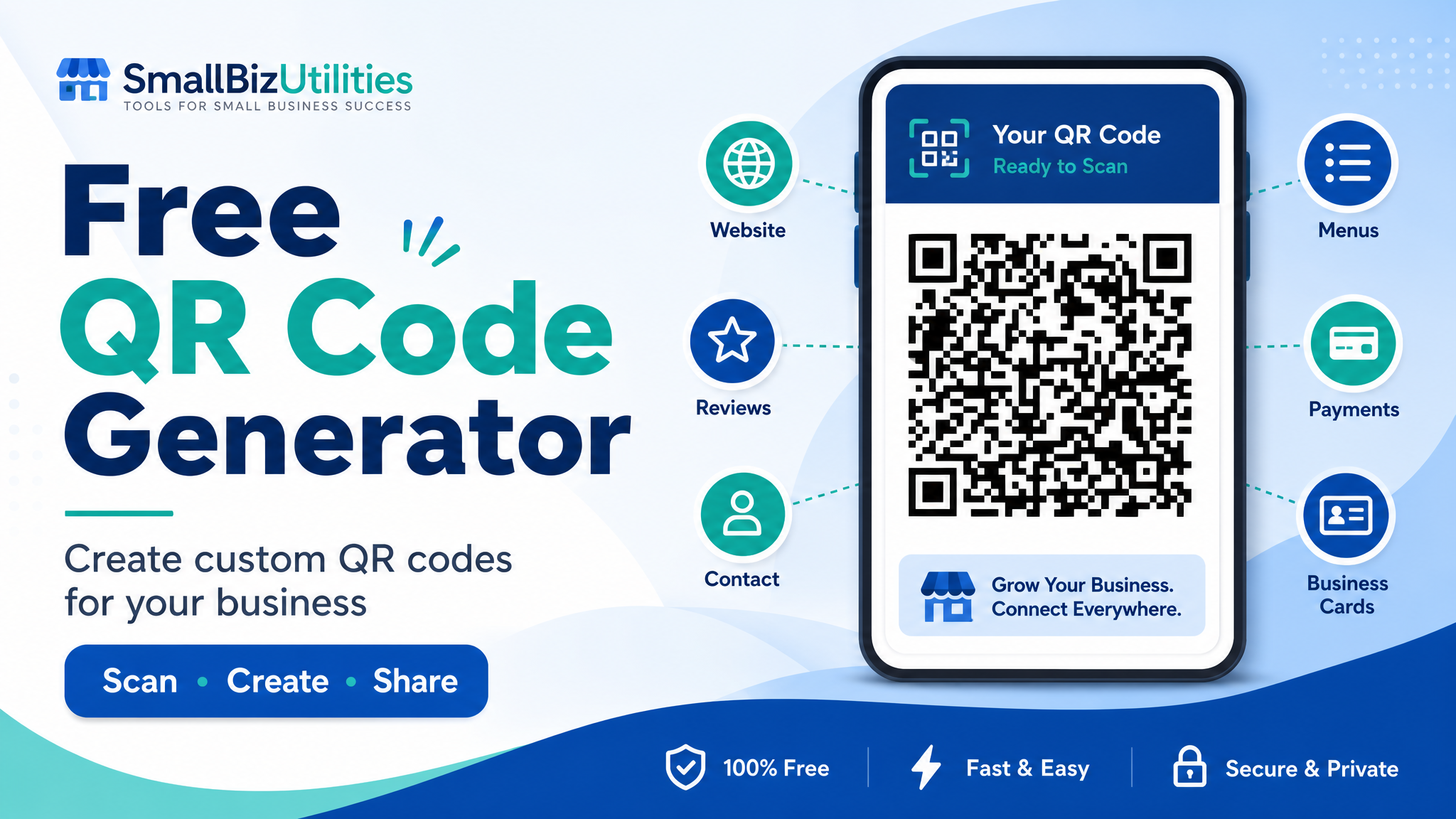
With the free QR Code Generator from Small Biz Utilities, you can create custom QR codes in just a few clicks. You can make QR codes for website links, plain text, email addresses, phone numbers, SMS messages, and more. You can also choose your QR code style, change the colors, pick the size, and even add your logo.
This guide will show you what QR codes are, why small businesses should use them, and how to create your own free QR code today.
What Is a QR Code?
A QR code is a square barcode that people can scan with a smartphone camera. When someone scans the code, it can send them to a website, show a message, open an email, start a phone call, or open a text message. QR stands for “Quick Response.” That means the code helps people get information fast. Most modern phones can scan QR codes without needing a special app. A customer can open their camera, point it at the QR code, and tap the link that appears. That simple action can help your business get more visits, more calls, more reviews, more bookings, and more sales.
Why QR Codes Are Great for Small Businesses
QR codes are useful because they make things easy for customers. People do not want to type long website links. They may forget your phone number. They may lose a paper menu or flyer. But if they can scan a code and go right where they need to go, they are more likely to take action. Here are a few reasons QR codes work so well for small businesses.
1. QR Codes Save Time
Time matters for both you and your customers.
Instead of asking customers to type your website address, you can let them scan a QR code. Instead of telling someone how to find your booking page, you can place a QR code on your sign, flyer, business card, receipt, or table tent.
One scan can take them to the right page. For example, you can send customers to:
- Your website
- Product page
- Booking page
- Menu
- Coupon
- Contact form
- Payment page
- Google review page
This makes the customer journey faster and easier.
2. QR Codes Help You Get More Website Visits
If you want more people to visit your website, QR codes can help. You can place QR codes on printed items like:
- Business cards
- Flyers
- Posters
- Brochures
- Receipts
- Product labels
- Menus
- Window signs
- Vehicle magnets
- Event banners
When people scan the code, they go straight to your website or landing page. This is helpful because printed marketing does not have to stop on paper. A QR code connects your offline marketing to your online business.
If you are ready to make one, try the free Small Biz Utilities QR Code Generator.
3. QR Codes Can Help You Get More Reviews
Good reviews are very important for small businesses. Many people check reviews before they call, book, buy, or visit. If your business has strong reviews, new customers may trust you faster. But many happy customers forget to leave a review unless you make it easy. A QR code can help. You can place a “Scan to Review Us” QR code on:
- Receipts
- Thank-you cards
- Front desk signs
- Table tents
- Follow-up emails
- Product packaging
- Service invoices
When customers scan the code, they can go right to your review page. Small Biz Utilities also has a
Google Review QR Generator, which is made to help businesses ask for Google reviews in a simple way. This can be a smart tool if you want to grow your online reputation.
4. QR Codes Make Menus and Documents Easier to Share
If you run a restaurant, cafe, food truck, salon, gym, church, school, office, or local service business, you may need to share documents often. QR codes can make this much easier. You can link a QR code to:
- Restaurant menus
- Price lists
- Service guides
- Product instructions
- Event programs
- Waivers
- PDF forms
- Class schedules
- Safety rules
- Warranty details
Instead of printing new copies all the time, you can update the online document and keep using the same printed QR code if the link stays the same. This can save money and reduce waste.
5. QR Codes Can Support Payments and Tips
Many businesses use QR codes to help customers pay faster. You can create a QR code that points to a payment link, donation page, or tip page. This can be useful for many types of businesses, such as:
- Food trucks
- Mobile service providers
- Salons
- Barbers
- Churches
- Nonprofits
- Bands
- Event vendors
- Market sellers
- Delivery services
You can link to tools such as PayPal, Venmo, Cash App, Stripe, or another payment page. If your business also needs a fast way to calculate tips, Small Biz Utilities offers a free Tip Calculator. This can help customers or staff quickly figure out the right tip amount.
6. QR Codes Help Customers Contact You Faster
QR codes can also make it easier for customers to contact your business. With the QR Code Generator, you can create codes for:
- Email addresses
- Phone numbers
- SMS messages
- Website links
- Plain text
For example, you could create a QR code that opens a pre-filled email. You could also create one that lets customers tap to call your business. This is helpful for service businesses like:
- Plumbers
- Electricians
- Lawn care companies
- Cleaning companies
- Lawyers
- Doctors
- Consultants
- Contractors
- Real estate agents
- Auto repair shops
The easier it is to contact you, the more likely people are to reach out.
7. QR Codes Are Great for Events
If your business attends events, QR codes are a must-have. You can use them at:
- Trade shows
- Vendor booths
- Local markets
- Job fairs
- Church events
- School events
- Fundraisers
- Networking meetings
- Conferences
- Pop-up shops
Put a QR code on your booth sign or handout. Then visitors can scan it to learn more, sign up, book a meeting, download a coupon, or follow you online. You can also use a QR code to collect leads. For example, send people to a form where they can join your email list or request a quote.
How to Create a Free QR Code
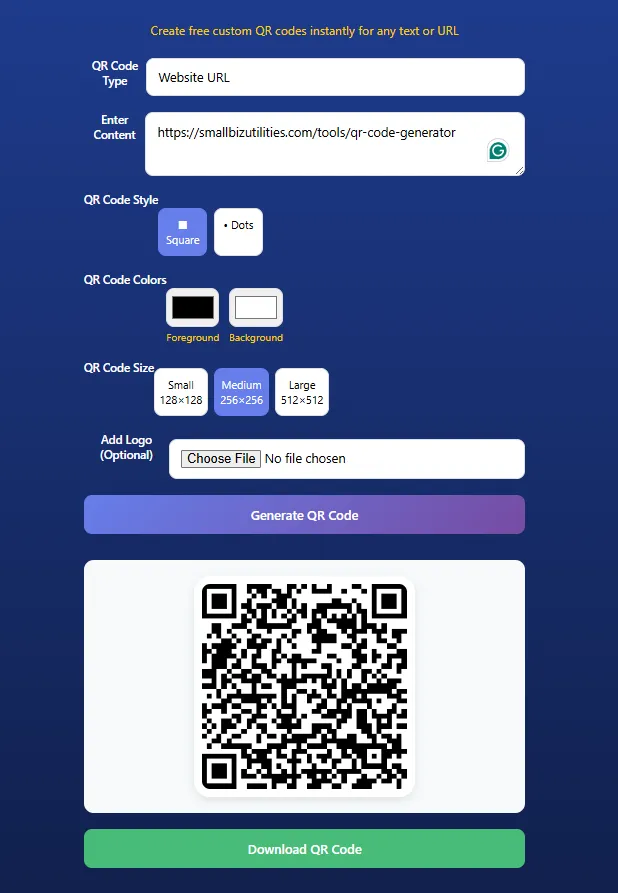
Creating a QR code is simple when you use the right tool. The free QR Code Generator from Small Biz Utilities is made to be easy. It works on desktop, tablet, and mobile devices. Here is how to use it.
Step 1: Choose Your QR Code Type
First, choose what kind of QR code you want to create.
You can make a QR code for:
- Website URL
- Plain text
- Email address
- Phone number
- SMS message
If you want people to visit a web page, choose the website URL option. If you want them to call you, choose the phone number option. If you want them to send a text, choose the SMS message option.
Step 2: Enter Your Content
Next, type or paste the content you want the QR code to use. This could be:
- Your website link
- Your booking page
- Your phone number
- Your email address
- A coupon code
- A short message
- A payment link
- A menu link
Make sure the information is correct before you create the code.
Step 3: Pick Your Style
The tool lets you choose a square style or a dots style. Both can work well. Pick the one that matches your brand and looks clear. If you plan to print the QR code, make sure it is easy to scan.
Step 4: Choose Your Colors
You can set the foreground and background colors. This helps your QR code match your business brand. For example, you may want to use your logo colors. But be careful. The QR code still needs strong contrast.
A dark QR code on a light background is usually best. If the colors are too close, phones may have trouble scanning it.
Step 5: Add Your Logo
You can also add your logo in the center of the QR code. This makes your QR code look more professional and helps people know it belongs to your business. Keep the logo small and clean. A large logo may make the code harder to scan.
Step 6: Choose the Size
The Small Biz Utilities QR Code Generator lets you choose from different sizes, including:
Small: 128 x 128
Medium: 256 x 256
Large: 512 x 512
If you plan to print your QR code, larger is often better. A bigger file can look clearer on flyers, signs, menus, and posters.
Step 7: Generate and Download
Once everything looks good, click the button to generate your QR code. Then download it and use it wherever you need it. You can add it to your business cards, print ads, menus, receipts, signs, emails, social posts, and more.
Best Places to Use a QR Code
Once you make a QR code, the next step is to use it in the right places. Here are some smart ideas.
On Business Cards
Add a QR code to your business card that links to your website, booking page, or contact page. This helps people connect with you after a meeting.
On Flyers and Posters
If you print flyers for your business, include a QR code that links to a special offer or landing page. Use a short call to action like:
“Scan to Book”, “Scan for Menu”, “Scan for 10% Off”, “Scan to Call”, “Scan to Review Us”, “Scan to Get a Quote”
On Menus
Restaurants, cafes, bakeries, food trucks, and bars can use QR codes to share online menus. This can make it easier to update prices, add new items, or share seasonal specials.
On Receipts
A receipt is a great place to ask for a review. Add a QR code that sends customers to your review page. You can also use the Google Review QR Generator to make this easier.
On Invoices
If you send invoices, you can add a QR code that points to your payment page or contact page. Small Biz Utilities also offers a Small Biz Invoice Generator, which can help small businesses create invoices more easily.
On Appointment Reminders
If you run a business that takes appointments, QR codes can help customers confirm, reschedule, or get directions.
You may also want to check out the Appointment Reminder Email/SMS tool. It can help you remind customers about upcoming visits.
On Product Packaging
If you sell products, QR codes can link to care instructions, videos, warranties, reviews, or reorder pages.
This gives customers more value without adding a lot of printed text.
On Signs
Add QR codes to front desk signs, window signs, table signs, vehicle signs, or checkout signs. Make sure the code is large enough to scan from the distance where people will stand.
Tips to Make QR Codes Work Better
QR codes are simple, but there are still a few best practices to follow.
Always Test Your QR Code
Before you print your code, test it. Use more than one phone if you can. Try both iPhone and Android devices.
Make sure the code opens the right page or action.
Use a Clear Call to Action
Do not just place a QR code with no words around it. Tell people what they will get when they scan.
Good examples include:
“Scan to Visit Our Website”
“Scan to Book an Appointment”
“Scan to See Our Menu”
“Scan to Leave a Google Review”
“Scan to Pay”
“Scan to Save This Coupon”
A clear call to action can increase scans.
Keep the Design Simple
A custom QR code can look great, but do not make it too busy. Use strong color contrast. Keep your logo small. Leave enough white space around the code. Simple designs often scan better.
Use the Right Size
If a QR code is too small, people may not be able to scan it. For print, a good rule is to make the QR code at least
2 cm by 2 cm. Bigger is better for signs, posters, and windows.
Link to Mobile-Friendly Pages
Most people scan QR codes with their phone. That means your landing page should look good on mobile devices.
Use short text, large buttons, fast-loading pages, and simple forms.
Other Helpful Small Biz Utilities Tools
Small Biz Utilities offers more than a free QR code tool. The website has simple apps made for small to large businesses. You can explore all tools on the Small Biz Utilities website.
Here are a few useful apps to check out.
Google Review QR Generator
The Google Review QR Generator helps businesses create QR codes that point customers to a Google review page.
This is great for businesses that want more reviews and better local trust.
Reputation Management
The Reputation Management tool can help businesses manage customer feedback and online reputation.
This can be helpful if you want to protect your brand and build trust.
Small Biz Invoice Generator
The Small Biz Invoice Generator helps businesses create invoices without making things hard.
This can be useful for freelancers, contractors, service providers, and local companies.
Appointment Reminder Email/SMS
The Appointment Reminder Email/SMS tool helps remind customers about appointments.
This can help reduce no-shows and keep your schedule full.
Tip Calculator
The free Tip Calculator helps quickly calculate tips.
This is useful for restaurants, delivery, salons, barbers, and service teams.
Sales Tax Calculator
The Sales Tax Calculator helps calculate sales tax fast.
This can be helpful for small shops, vendors, and service businesses that need quick totals.
941 Tax Calculator
The 941 Tax Calculator can help businesses with payroll tax estimates.
This is useful for employers who want a simple way to work with Form 941 numbers.
Resume Evaluator
The Resume Evaluator helps review resumes. This can be helpful for job seekers and hiring teams.
Why Use Small Biz Utilities?
Small Biz Utilities is built for business owners who want simple tools that are easy to use. You do not need to be a tech expert. You do not need to spend hours learning software. The tools are made with plain language and simple steps. The goal is to help small businesses save time, improve daily tasks, and grow with helpful online apps. The free QR Code Generator is a great example. It is simple, fast, and useful for many types of businesses.
You can create custom QR codes with:
- No account required
- Unlimited free QR codes
- Mobile, tablet, and desktop support
- Custom colors
- Logo upload
- Multiple sizes
- Square or dots style
- Easy download
It is a simple tool, but it can have a big impact.
Start Creating QR Codes Today
QR codes are one of the easiest ways to connect your offline marketing to your online business. They can help customers visit your website, call you, send a message, pay, book, view a menu, read a document, or leave a review. If you own a small business, this is a tool worth using.
You can start today with the free Small Biz Utilities QR Code Generator. Create your first custom QR code in minutes, download it, test it, and add it to your next flyer, menu, sign, business card, invoice, or receipt. Need more simple business tools? Visit Small Biz Utilities to explore apps for reviews, invoices, appointment reminders, calculators, reputation management, and more.
Ready to make your business easier for customers to reach?
Create your free custom QR code now with the Small Biz Utilities QR Code Generator. Then explore more helpful tools at Small Biz Utilities to save time, get more reviews, manage invoices, and grow your business.
While you wait, explore more about what we do:
Simple User Friendly Apps for Small to Large Businesses to Make Your Life Easier
Our Services
QR Code Generator - FREE
Resume Evaluator - FREE
Google Review QR - FREE & PAID
Small Biz Invoice Generator -FREE TRIAL & PAID
Appointment Reminders - PAID (SMS & EMAIL)
Tip Calculator - FREE
Sales Tax Calculator - FREE
941 Tax Calculator - FREE & PAID
Reputation Management - PAID
b
"By using this tool, you agree to our [Terms of Service] and [Privacy Policy]"
Copyright 2026. Clickitpros.com. All rights reserved.